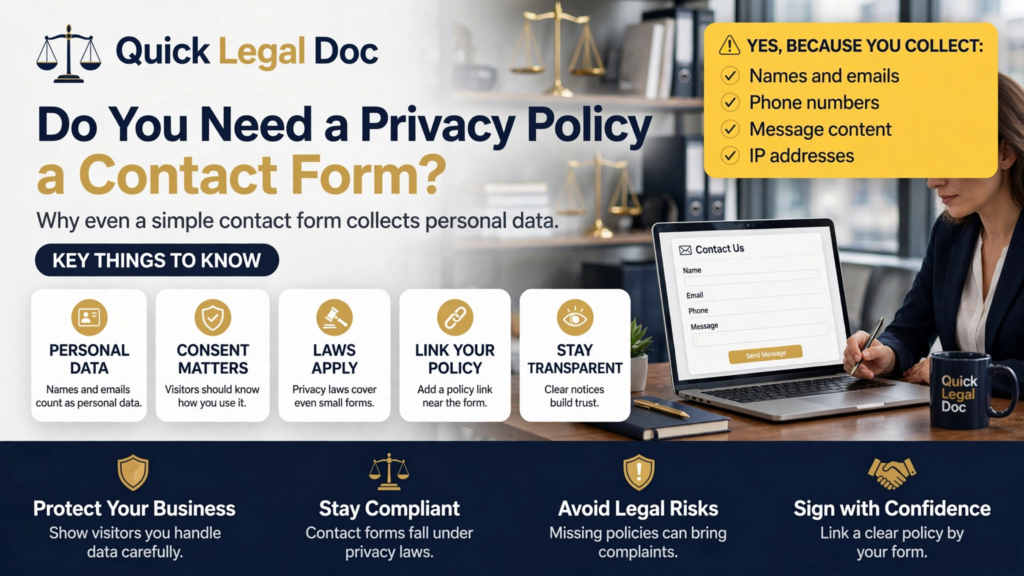
Yes, you need a privacy policy for a contact form. A form that collects names, email addresses, or phone numbers is collecting personal information, and privacy laws require you to disclose what you collect and what you do with it. The size of your site does not change this.
This article explains why a privacy policy for contact form pages is legally necessary, what the form actually collects behind the scenes, what your policy must disclose about it, and what happens when site owners skip this step.
Do You Need a Privacy Policy for a Contact Form Under the Law?
Yes. The trigger for privacy law is the collection of personal information, not the size or type of your website. A contact form collects names, email addresses, and often phone numbers or company details, which are textbook examples of personal information under laws like the California Consumer Privacy Act and the EU’s General Data Protection Regulation. One form is enough.
Many small site owners assume these laws target only big tech companies. They do not. While some laws have thresholds based on revenue or user counts, the basic duty to tell people what you collect applies broadly, and several US state laws now cover smaller businesses than their owners expect. A contact form with no policy is one of the most common compliance gaps on the small web.
Cornell Law School’s Legal Information Institute provides a clear overview of privacy law and the principles behind it, which helps explain why even minimal data collection creates disclosure obligations. The law cares about the fact of collection, not the scale.
If your site has any form that asks for personal details, a quote request, a newsletter signup, a booking form, the same logic applies. The contact form is just the most common example, and the one most often left unprotected.
What Data Does a Contact Form Actually Collect?
More than the fields you see. The obvious data is what the visitor types: name, email, phone, message. But the form also generates metadata behind the scenes. Your server logs the visitor’s IP address and the time of submission. Spam protection tools like reCAPTCHA collect behavioral and device data. Your form plugin may store entries in your site’s database indefinitely.
Each of these counts. An IP address is personal information under many privacy laws. Stored form entries are a database of personal data sitting on your server. The spam filter’s background collection is processing you authorized by installing it. Your policy needs to account for all of it, not just the visible fields.
This is why “it’s just a contact form” is a dangerous phrase. The form is the front door to a small data operation: collection, transmission, storage, and sometimes analysis. Once you see the full picture, the need for a written policy stops feeling like overkill.
What Must Your Policy Disclose About the Form?
At minimum, four things. First, what the form collects, including the visible fields and the background data like IP addresses. Second, why you collect it, typically to respond to the inquiry. Third, how long you keep submissions, whether that is thirty days, a year, or indefinitely. Fourth, who else sees the data, such as your hosting provider, your email service, or a CRM the submissions feed into.
The retention point deserves emphasis because almost nobody thinks about it. Form entries pile up in databases for years, long after the conversation ended. Stating a retention period, and actually deleting old entries, is one of the simplest ways to show you take data minimization seriously.
Also disclose what you do not do with form data. If you never add form submitters to a marketing list without separate consent, say so. That single sentence prevents the most common visitor complaint about contact forms, the surprise newsletter subscription that follows a simple inquiry.
What Happens If You Run a Form With No Policy?
In practice, most sites with this gap never face enforcement. Regulators have limited resources and focus on larger targets. But “unlikely to be caught” is not the same as compliant, and the risks are real enough to take seriously, especially as state privacy laws multiply and complaint mechanisms get easier to use.
The more immediate risk is trust. Visitors are increasingly privacy aware, and a contact form asking for personal details with no linked policy looks careless. Some visitors will abandon the form. Others will submit and then complain when they get an unexpected marketing email. Both outcomes cost you more than a policy ever would.
There is also platform risk. Ad networks, payment processors, and business directories increasingly require a privacy policy as a condition of approval. Our guide on whether you need a privacy policy covers these triggers in detail, and a bare contact form page is one of the most common reasons small sites get flagged during reviews.
Where Should the Policy Live on a Contact Page?
Link it where the data is collected. The standard practice is a short consent line near the submit button, something like “By submitting this form, you agree to our privacy policy,” with the words “privacy policy” linking to the full document. This puts the disclosure at the exact moment of collection, which is what the law wants.
Also link the policy in your footer, so it is reachable from every page. A policy that exists but cannot be found is barely better than no policy. Two links, one at the point of collection and one in the footer, cover both the legal requirement and the practical one.
Do not hide the link in tiny gray text or bury it three clicks deep. Regulators and visitors alike judge the prominence of the disclosure, not just its existence. If someone has to hunt for your policy, you have already failed the transparency test.
How Do You Get a Policy That Covers Your Form Properly?
Answer a few honest questions about your form: what fields it has, where submissions go, how long you keep them, and which services touch the data. Those answers are the entire foundation of the policy section about your form. For most small sites, this takes ten minutes of thinking.
The Quick Legal Doc privacy policy generator turns those answers into a complete, readable policy that covers your contact form and everything else your site collects. You describe your actual practices in plain language, and it produces a document that says what you do, accurately and completely.
Frequently Asked Questions
Q: Does a contact form really count as collecting personal information?
A: Yes. Names, email addresses, and phone numbers are personal information under every major privacy law. The form does not need to be elaborate, a single name and email field is enough to trigger disclosure obligations.
Q: What if my form does not store entries and only emails me?
A: You still need a policy. Emailing the submission is still collection and transmission of personal data, and the email itself becomes stored data in your inbox. The storage location changed, but the obligation did not.
Q: Do I need a checkbox for consent on my contact form?
A: It depends on your jurisdiction and what you do with the data. For a basic inquiry form, a clear link to your privacy policy near the submit button is usually enough in the US. If you add submitters to marketing lists, or you serve EU visitors, explicit opt-in consent is the safer path.
Q: Can I use one privacy policy for my whole site including the form?
A: Yes, and you should. One site-wide policy with a section covering the contact form is the standard approach. Separate policies for individual pages create confusion and are harder to keep accurate.
Q: How often should I review the form section of my policy?
A: Review it whenever you change the form, add a field, switch form plugins, or connect submissions to a new service like a CRM or email platform. An annual review of the whole policy is good practice even if nothing changed.
The templates and articles on Quick Legal Doc are provided for informational purposes only and are not legal advice. Every business situation is different, so consult a licensed attorney in your state before relying on any privacy policy for your specific circumstances.